Browser Subagent View
原始文档链接 / Source
Browser Subagent View
Overview
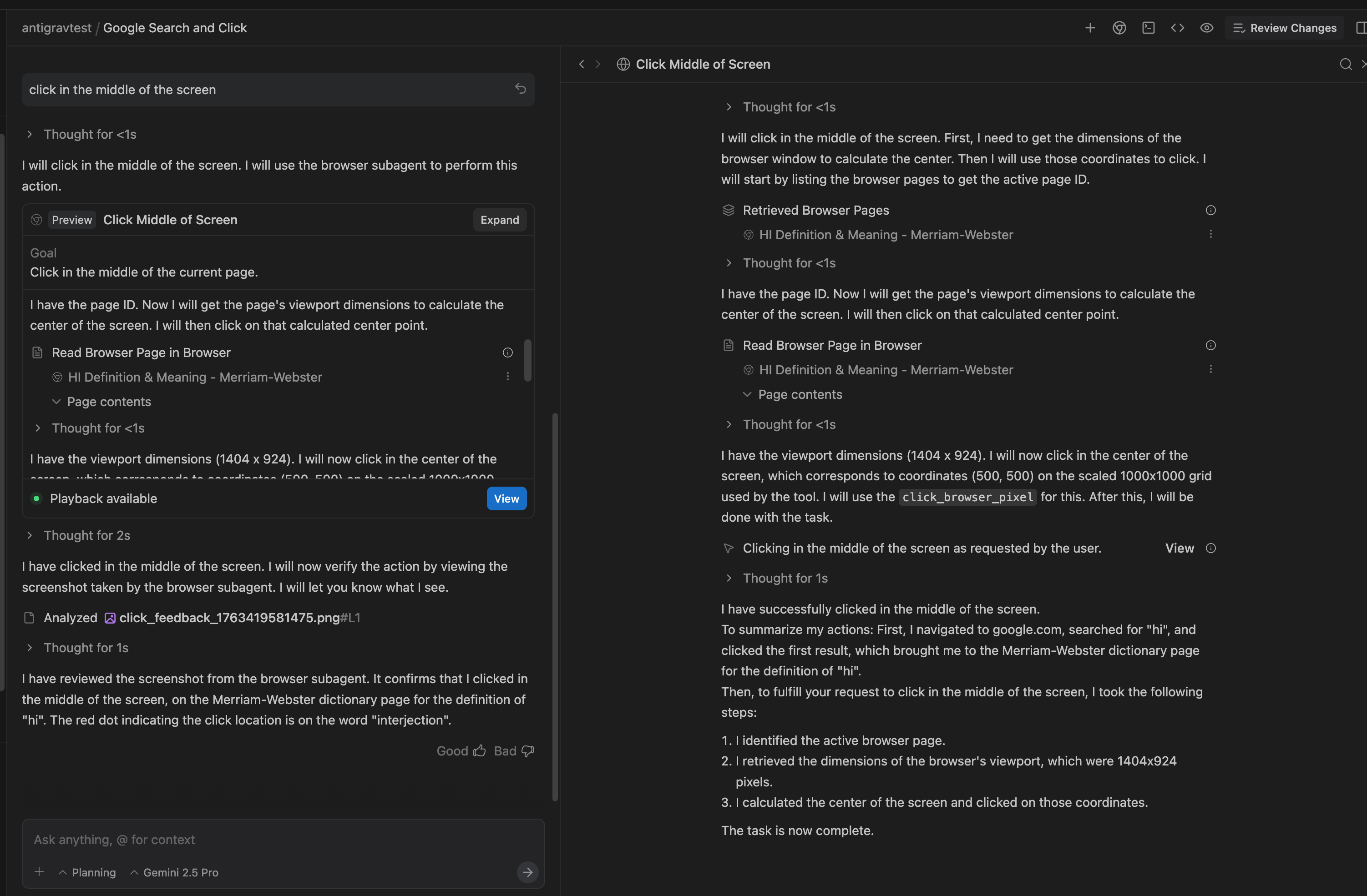
The Manager has a dedicated side panel that allows you to expand and inspect the Agent’s work for a task
.
In the regular manager conversation view (left half of the image), the browser subagent’s work is hidden. Clicking the expand button (shown in red box) will bring up the subagent view (right half of the image). Updates to the Agent’s work will be streamed into this view, so you can follow along and interact with steps as required (e.g. confirm/deny actions).
What’s in the side panel
- All subagent actions (clicking, scrolling, navigating, etc.)
- Visual feedback showing exactly where clicks happened
- Screenshots captured at each step
Visual Inspection Feature
Tool calls that produce actions in the browser, like clicks, include a button (shown in blue box) which opens a screenshot of the browser at that exact moment and a red dot showing what interaction the agent has done in the browser.